
MES vs ERP: What Each System Does on a Factory Floor
 Asem Alkamel
10 min read
In this article
- MES vs ERP in one sentence: ERP plans and accounts, MES executes
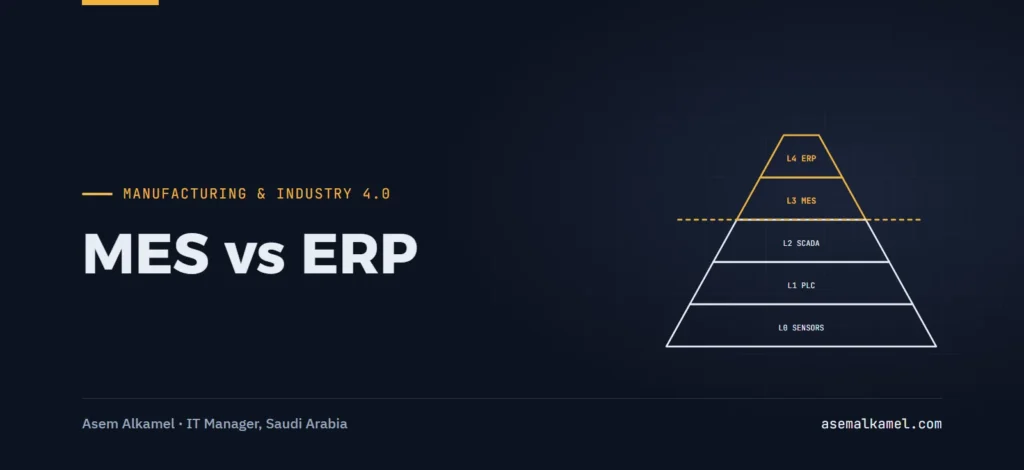
- Where MES and ERP sit: the ISA-95 levels
- What is MES, concretely: the functions that matter
- What ERP for manufacturing does, and where it stops
- What flows between MES and ERP
- Where MES and ERP overlap, and who should win
- Signs your factory needs an MES
- Mistakes I see in MES and ERP projects
- Key takeaways
- Frequently asked questions
- Can an ERP replace an MES?
- What is the difference between MES and SCADA?
- Does SAP Business One include an MES?
- What data should be synchronized between MES and ERP?
The difference between MES vs ERP is a difference of time horizon and ownership: the ERP plans and accounts for production in days, weeks and money, while the MES executes and records it in minutes, batches and kilograms. You need an ERP to run the company; you need an MES when the gap between what the ERP thinks happened on the floor and what actually happened is costing you reconciliation hours, quality escapes or inventory you cannot explain.
I run both at a feed manufacturer in Al-Qassim, Saudi Arabia. When I joined NAF Company as IT Manager there was no ERP at all. We implemented SAP Business One and integrated it with an MES, Jisr HR and a custom feed formulation system, so that production data now syncs with administration in real time. Before that integration, someone reconciled production sheets against inventory and accounting by hand. That manual reconciliation ended entirely, and it is the clearest everyday illustration I have of what each system is for.
MES vs ERP in one sentence: ERP plans and accounts, MES executes
An ERP (enterprise resource planning) system is the system of record for the business: items, bills of materials, customers, suppliers, purchase and sales orders, inventory values, costs, payroll and the general ledger. In a manufacturing company it also carries production orders and material requirements planning. Its unit of time is the day or the shift, and its unit of truth is the posted document.
A manufacturing execution system (MES) is the system that runs the production order once it reaches the floor: dispatching it to lines, guiding operators, collecting actual quantities, weights, times, batches and quality results from machines and people, and handing a finished record back. Its unit of time is the minute or the second, and its unit of truth is the event: this batch, this dosing, this stop, this operator.
The ERP answers “what should we make, what did it cost, and what do we have?” The MES answers “what is happening on line 2 right now, and what exactly went into batch 4471?”
Where MES and ERP sit: the ISA-95 levels
The standard most people use to draw the boundary is ISA-95 (published internationally as IEC 62264), which describes manufacturing as a hierarchy of levels and defines what information should be exchanged between the business level and the operations level. The Siemens summary of the ISA-95 framework is a readable primary reference.
| ISA-95 level | What lives there | Typical systems | Time horizon |
|---|---|---|---|
| Level 4 | Business planning and logistics: orders, inventory, costing, finance | ERP (SAP Business One, Odoo and others) | Days to months |
| Level 3 | Manufacturing operations management: dispatching, execution, tracking, quality, performance | MES / MOM, historians | Shifts, hours, minutes |
| Level 2 | Monitoring and supervisory control of the process | SCADA, HMI, DCS, PLC logic | Seconds |
| Level 1 | Sensing and manipulating the process | Sensors, actuators, drives, scales | Milliseconds to seconds |
| Level 0 | The physical process itself | Mixers, pellet mills, conveyors, dryers | Continuous |
The model’s practical value is the discipline of asking, for every piece of data, “which level creates this, and which level only consumes it?” A quantity created at Level 3 by a scale and typed again at Level 4 by a clerk is an integration problem wearing a staffing costume.
What is MES, concretely: the functions that matter
MES vendors list dozens of functions. In a mid-sized plant, five of them carry almost all the value:
- Order dispatching and sequencing. Receiving released production orders from the ERP and deciding which line runs them in what order, with changeovers and cleaning in mind.
- Execution guidance. Showing the operator the recipe step, target weight, tolerance and the next action; in a feed plant this is dosing by ingredient, mixing time, pelleting parameters and bagging.
- Data collection. Actual consumption per ingredient, actual output, start and stop times, downtime reasons, scale readings. Ideally from the equipment, not from a keyboard.
- Batch and lot genealogy. Which raw material lots went into which finished batch, which is the backbone of any recall and of the acceptance testing I ran on our own MES.
- Quality and performance records. In-process checks, holds, and the numbers that feed availability, performance and quality calculations.
What ERP for manufacturing does, and where it stops
SAP Business One, which I know best, has real production functionality: bills of materials, production orders, issue for production, receipt from production, backflushing, and standard or moving-average costing of what comes out. That is enough for many assembly or light-manufacturing businesses, and it is a mistake to buy an MES because the vendor’s slide says Industry 4.0.
Where the ERP stops is the floor itself. An ERP production order says “make 10 tonnes of broiler starter from this BOM.” It does not know that batch 3 was under-dosed and topped up, that the mixer stopped for 11 minutes, or that the scale drifted. In a process plant running many batches per shift, being told these things “after the fact by a document” means a clerk, a spreadsheet, and a reconciliation meeting.
In feed manufacturing there is a third system in the picture: the formulation system, which calculates recipes from nutritional targets and ingredient prices and availability. Recipes change far more often than a classic ERP bill of materials expects. In our setup the formulation system, the MES and SAP Business One each own a distinct part of the chain: the formula is created in one place, executed in another, and accounted for in the ERP, with integration doing the copying instead of people. The case study of that integration describes the project.
What flows between MES and ERP
The integration is not a vague “connect the systems.” It is a short list of messages, each with an owner, a trigger and a direction. This is the list I would start any MES-ERP integration workshop with:
| Data | Direction | Trigger | Owner of truth |
|---|---|---|---|
| Item master (raw materials, finished goods, units) | ERP to MES | On create or change | ERP |
| Recipe / BOM version | Formulation system to ERP and MES | On approval of a new formula | Formulation system |
| Production order (what, how much, by when) | ERP to MES | On release | ERP |
| Raw material lots and available stock | ERP to MES | On receipt or transfer | ERP |
| Actual consumption per ingredient and lot | MES to ERP | Per batch or per order close | MES |
| Actual output, finished-goods batch number, timestamps | MES to ERP | Per batch | MES |
| Downtime, rejects, quality holds | MES to ERP or BI | Per shift | MES |
| Order status (started, finished, cancelled) | Both ways | On change | Each for its own states |
Two rules make this table work in real life. First, one owner per field: if both systems can edit an item’s unit of measure, you will eventually post a batch in the wrong unit. Second, actuals go up, plans go down: the MES never invents a production order and the ERP never overwrites a measured weight.
“Real time” in our case means that a batch completed on the floor appears in SAP Business One as consumption and receipt without anyone re-keying it, not sub-second messaging. For most plants, posting per batch or every few minutes is enough and far easier to support.
Where MES and ERP overlap, and who should win
Overlap is unavoidable because vendors on both sides keep expanding. These decision rules settle most arguments:
- Inventory quantities: the ERP wins. The MES may hold a floor stock view, but the valued quantity is the ERP’s.
- Batch genealogy and actual weights: the MES wins. The ERP stores the result; it does not re-derive it.
- Scheduling: the ERP decides what and when at order level; the MES decides sequence at line level. If your plant has one line and few changeovers, let the ERP do both and skip the MES scheduler.
- Quality: the MES captures in-process results; the ERP records the release decision that affects saleable stock.
- Costing: always the ERP. Feed the ERP accurate actuals and let it cost them; do not build a second cost model in the MES.
- Reporting: neither. I build the executive dashboards our CEO and Board use from SAP Business One data combined with production figures, not from either system’s screens.
Signs your factory needs an MES
You probably need an MES if three or more of these are true:
- Production is recorded on paper or in spreadsheets and typed into the ERP later, by a person whose job title is essentially “reconciler.”
- Your recipes or BOMs change weekly or more often, and the floor sometimes runs an older version.
- You cannot answer “which raw material lots are in this finished batch?” in under an hour.
- Actual consumption differs from BOM consumption by a margin you cannot explain, and the variance report arrives too late to act.
- Regulators or customers ask for traceability records that are assembled by hand.
- You have scales, PLCs or SCADA producing data that nobody stores or uses.
- Downtime reasons are known in the operators’ heads and nowhere else.
If only one or two apply, start with disciplined use of the ERP’s production module and a scale or barcode interface. A poorly implemented MES adds a third place for data to be wrong. When I audited our delivered MES against the signed requirements with a 60-point test plan across four test cycles, it surfaced 3 defects and around 20 functional gaps, and that evidence is what let us negotiate a controlled partial acceptance instead of signing off on a promise.
Mistakes I see in MES and ERP projects
- Buying the MES before the ERP master data is clean. The MES inherits every duplicate item and wrong unit of measure. Fix the item master first; the data migration checklist applies to the MES as much as to the ERP.
- Letting the vendor define the integration. The vendor will integrate what is easy for their product. Write the message list above yourself, with your owners and triggers, and put it in the requirements.
- Treating “real time” as a feature instead of a requirement with a number. Specify latency and failure behavior: a batch posted while the ERP is down must queue, not vanish.
- No reconciliation during the first months. Compare MES output with ERP receipts daily until the exception list stays empty for weeks.
- Accepting the MES on a demo. Accept it on your test plan, scenario by scenario, against your signed specification.
- Skipping the recipe question. In process industries the formulation system is the hidden third party. Decide where recipe versions live before anyone writes an interface.
Key takeaways
- ERP owns planning, inventory value, costing and finance; MES owns execution, actual quantities, genealogy and floor events.
- ISA-95 puts ERP at Level 4 and MES at Level 3; use that boundary to assign one owner to every data field.
- The integration is a short list of messages: plans flow down, actuals flow up, and neither system overwrites the other’s truth.
- Real-time sync is valuable because it ends manual reconciliation, not because it is fast; specify latency and failure handling explicitly.
- An MES is justified by paper-based recording, frequent recipe changes, traceability gaps and unexplained variances, not by a slide deck.
- Accept an MES against your own test plan; the defects and gaps you find are your negotiating position.
Frequently asked questions
Can an ERP replace an MES?
For light assembly or low-volume manufacturing, an ERP production module with barcode or scale input is often enough. In process plants with many batches per shift, frequent recipe changes and lot genealogy requirements, an ERP cannot capture floor events at the needed granularity, and the gap is filled by spreadsheets and reconciliation staff. That is when an MES pays for itself.
What is the difference between MES and SCADA?
SCADA sits at ISA-95 Level 2 and supervises and controls equipment in seconds: valves, motors, setpoints, alarms. An MES sits at Level 3 and manages the production order: what to make, in what sequence, with what actual consumption and quality results. SCADA tells you the mixer is running; the MES tells you which batch it is mixing and for which order.
Does SAP Business One include an MES?
SAP Business One includes production orders, bills of materials, issue and receipt from production and production costing, but not shop-floor execution functions such as operator guidance, machine data collection or batch genealogy at the dosing level. Those come from an integrated MES or an add-on; in our plant, SAP Business One is integrated with a separate MES and a formulation system.
What data should be synchronized between MES and ERP?
Downward from the ERP: items, bills of materials or recipes, released production orders and available raw material lots. Upward from the MES: actual consumption per ingredient and lot, actual output with batch numbers and timestamps, order status, and shift-level downtime and quality data. Each field should have exactly one owning system.
If you are deciding whether your plant needs an MES, or you have both systems and they still disagree, I can help you define the data ownership, write the integration requirements and run the acceptance testing from the company’s side. See the Industry 4.0 and manufacturing systems service or get in touch to talk through your setup.